
CottBuzz

Add to Home Screen

CottBuzz Home Screen icon

Keep CottBuzz one tap away. No app store needed.

iPhone / iPad

  1. Open cottbuzz.com.au in Safari or Chrome.
  2. Tap your browser’s Share button , the square with an upward arrow. You may need to open the browser’s menu first.
  3. Scroll down and choose Add to Home Screen. On iPad, tap View More or More first if needed.
  4. Turn on Open as Web App if shown, then tap Add.

Missing the option? In Safari, scroll to Edit Actions to add it. If your browser doesn’t offer it, try Safari.

Android

If the Install CottBuzz button is shown, tap it and follow the prompts. Or:

  1. Open cottbuzz.com.au in Chrome.
  2. Open Chrome’s More menu (⋮), then choose Install and create shortcut.
  3. Choose Install or Create shortcut, then follow the prompts.

Older versions may call this Add to Home screen or Install app.

Opened CottBuzz inside another app? Open it in Safari on iPhone/iPad or Chrome on Android first. An internet connection is still needed.

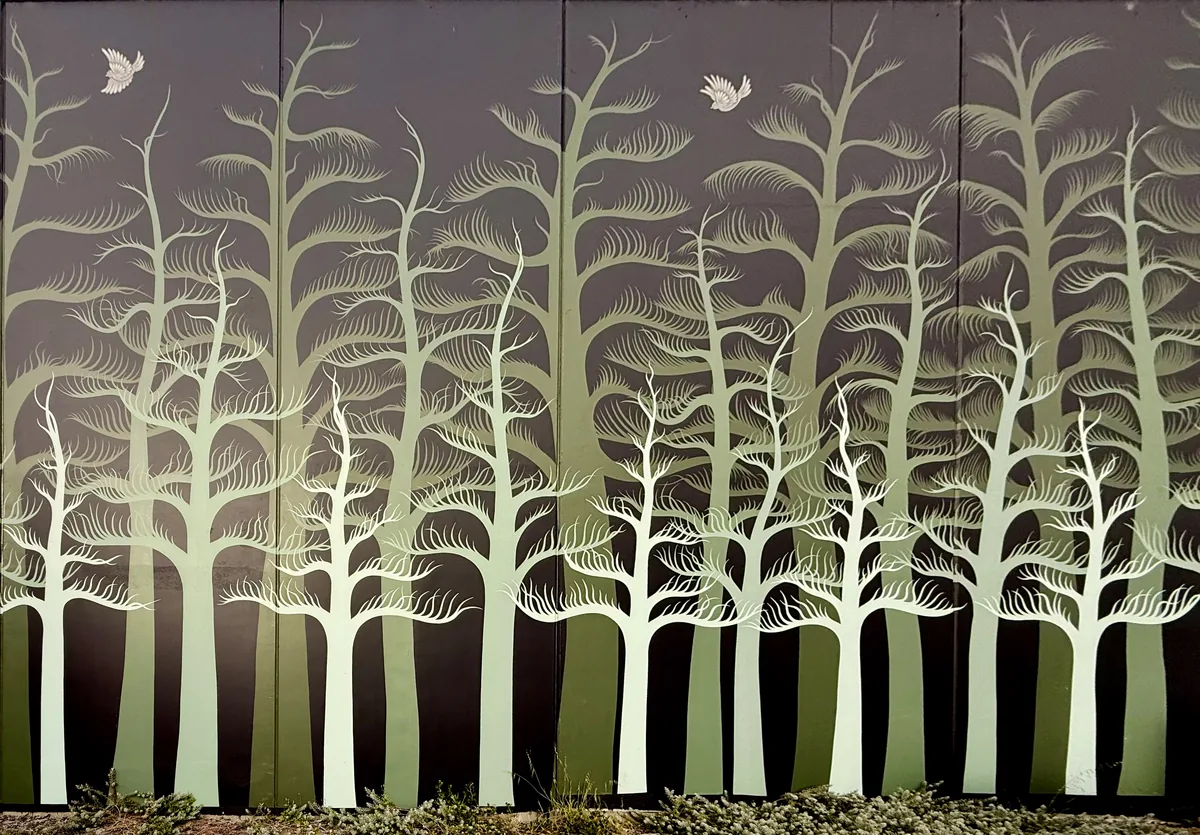
Norfolk Pines mural

A forest hiding in plain sight. Tall trunks and fine, feathery branches stretch across this enormous wall, turning a passing glance into a reason to stop. Soft greens against charcoal give the painted pines a lovely sense of depth. Look up for the birds tucked between the treetops.

Open on the CottBuzz map
Norfolk Pines mural

On the building wall at the marked location.

Painted in 2023, this mural covers more than 300 m². The artist is Robert Jenkins, who works as The Black Mountains Art. Originally from the Black Mountains in Wales and now based in Perth, he brings flowing patterns to Cott’s familiar Norfolk pines.

Take in the whole wall first, then look closer at the delicate branches. The artist’s signature and the year 2023 are painted into the work. Meet the artist at The Black Mountains Art.

Useful links